
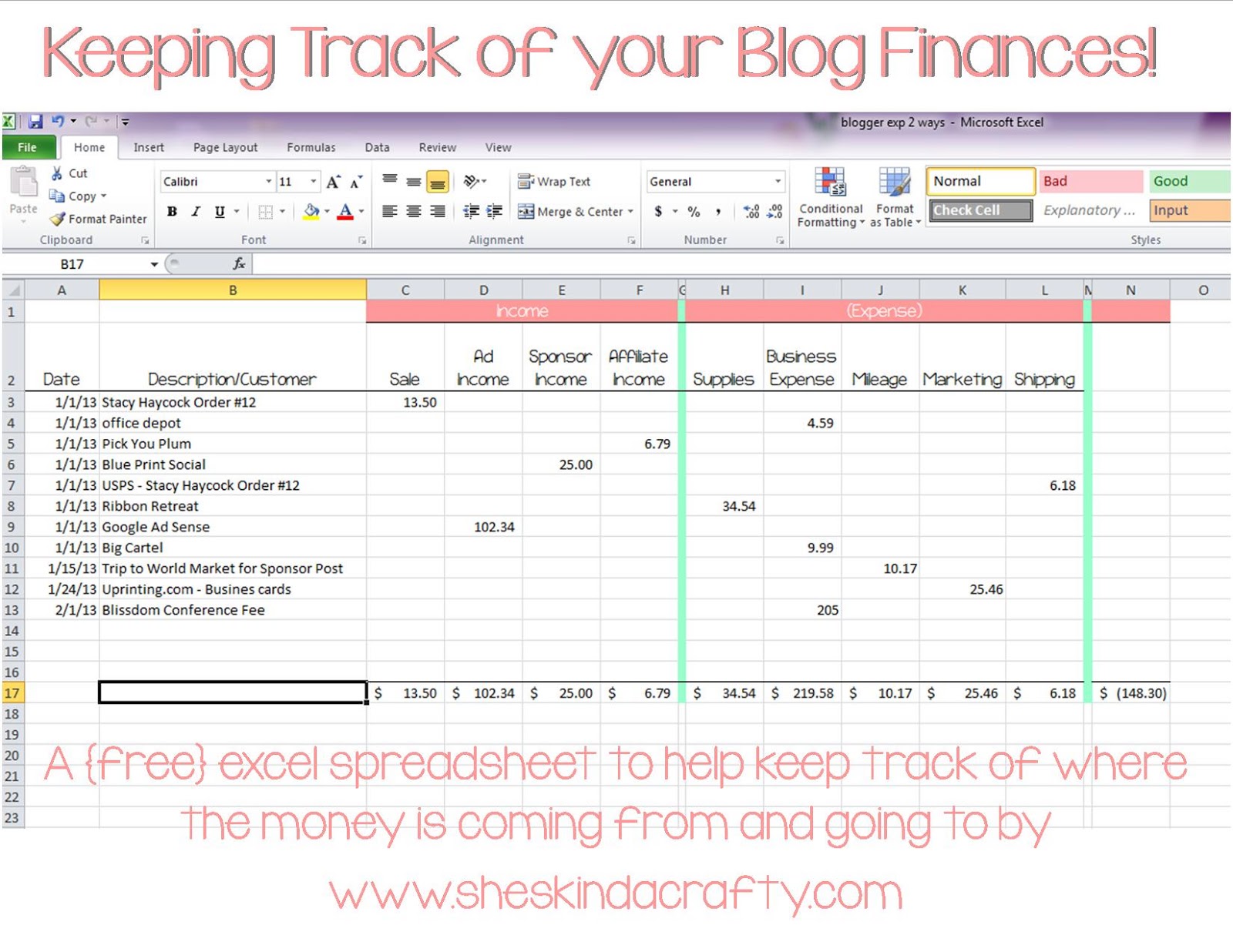
This spreadsheet is very easy to use and easy to customize and update for your own personal needs. Just follow these simple steps and you will never have to worry about any of the built in formulas!
1) If you want the header fonts that I used to show up on your spreadsheet you will have to download KG Payphone (free for personal use) but feel free to use any fonts you want.
2) NEVER type in or delete any of the mint green rows or columns – feel free to change their color to match your own scheme if you’d like but do NOT use them or delete them.
3) To add your own Income or Expense columns across the top highlight the mint green column (G in the above example if you want a new income column) right click and select insert. That will insert a column directly to the left of the mint green column and keep the formulas working. Same thing for the Expense categories – just highlight the mint green column to the right of the expense section (column M in the above example), right click and select insert.
4) To add more line items (rows) highlight the bottom mint green line which you will see when you download your own file, it is missing from the above example but it would be row 16, right click and insert a new row. That will insert a new row directly above the green row and keep your formulas working.
That’s it! Feel free to add as many columns of income and expense as you need to make your year end (or quarterly) tax preparation easier.
You can download your own Blogger Tracking Spreadsheet here for free (it’s free but I really love comments if you do choose to download it, it’s an easy form of payment).
I am not a tax professional so I can’t really answer any of your tax questions but if you have questions on how to use this spreadsheet or tips of that nature please feel free to contact me.
linked up – tatertots and jello


You rock my world, Stacy! THANK YOU!! 🙂
Thanks SO much Stacy! You are amazing!
i love you! you are amazing. i would probably be in jail without you’re help from the IRS. LOL
xo
kellie
Stacy thanks so much for this!
This is awesome!!! Thank you so much. I am downloading and pinning for all my blogger friends.
Thanks so much for sharing!
Thank you for sharing. Another great program that helps you keep track, especially if you sell on Etsy, is Outright.com. It automatically uploads your Etsy and paypal accounts that you link to it. 🙂
I have heard of this but haven’t tried it yet. I wil have to check it out. Do they let you export the info into excel? B/c then it would be super simple to add it to this work sheet and keep everything in 1 place!!
This is awesome! I have not been very good at keep track of my income and expenses, but this will help me out a lot. Thanks for sharing!
Amazing! Just downloaded it. Thank you so much!
Thank you! I’m going to use it starting TODAY!! Woot
Ilana W. Thank you! Starting to use it right now 🙂
Thanks for sharing! Pinned and downloaded :o)
What a great resource! I am going to share on SNAP! BTW, this would be a great class at SNAP! Conference 🙂
Thanks so much for this Stacy!
I’ve been needing something like this for awhile and I am not a “numbers” person at all, so I didn’t know where to start.
You’re the best!
Lisa H.
NICE!!! Love this! Thanks so much!
Amber
http://www.crazylittleprojects.com
Thank you! This is so much more organized than my old excel program.
Thank you so much for this! I have not kept track of anything blogging related, because it just makes my head hurt. I’ve downloaded this, so hopefully it will help!
Ummm this is great! Thank you for this wonderful resource!
Thank you SO much! Kellie was raving about you to me! She was right. Your a SMART girl!
thank you!!!!
i’m so excited for this! i’ve been looking for a great way to track my expenses and income, and I think I found it! thank you.
Thank you for this great tool!
LOVE it Stacy!!! you rock…..I’d hire you to do my book keeping/accounting HA! 🙂 Thanks for sharing!!
Fantastic! So useful and cute too!
Thanks Stacy! My husband thanks you too; haha! 🙂 Pinning and sharing your download!
Mackenzie 🙂
YOU ROCK!!!!!!!!!!! thank you so so so so much! i am in serious need of this right now for my book AND my blog!
thanks girlie!! xo
Thank you! I needed this 🙂
I love Excel spreadsheets so this made me happy :). Thanks for the link – just downloaded it!
Nicole ~ My Happy Place
http://www.etsy.com/shop/myhappyplaceshop
http://www.facebook.com/myhappyplaceshop
One thing I have never tracked is mileage – need to do that! So is mileage the same rate for everyone?
Muchas gracias! Thanks very much for sharing this. Amazing
Ines
Thanks for the freebie, it’s an awesome resource and one I will actually use!
Thank you so much for writing this post and for the freebie. I will use it. Hugs! xo
This is wonderful, thank you!! -Kelly @ Semi Homemade Mom
Thanks Stacy! Love it!
Awesome!!! Thanks so much!
Downloaded for my blog: http://www.GrowingUpTriplets.com
Thanks so much! 🙂
Thank you so much for this! I downloaded it and know that it is going to help me get better organized.
Thanks for the awesome worksheet!
This is great and so cute. I can’t wait to download!
Wow! Thanks for this. This is so much more detailed than the income/expense spreadsheet I was going to make. And it’s so great to know you do this “in the real world”! 😉
I just found you. Thank you for sharing your expertise in this area. I have begun tracking my expenses for upcoming craft shows…now just waiting for the income to begin to roll in!
This is exactly what I was looking for! Thank you SO much!
Shelly @ Vegetarian ‘Ventures
Amazing, thank you so much! I Googled for something like this & I am so glad I found you 🙂
I downloaded this! Thank you!
Thank you SOOOO much!!!!!!!
I’m using this right now… amazing. This is exactly what I needed! Thank you sooooo much!!!
This is fantastic! I just started my taxes this weekend! Thank you for sharing!
So glad I found this, thank you!!
Thanks so much for sharing this!
Thank you so much for sharing! This is exactly what I was looking for! You’re the best!
I am having difficulty keeping the formula when I add a new column. I followed the instructions above exactly (highlighted the mint green column, right clicked, hit add column) – the problem is that the formula doesn’t get added to the new column…any help is much appreciated!
This comment has been removed by the author.
THANK YOU!!!!!!!!!!!!!!!!!
This is great! Thank you so much!
Thank you for this! I was going to try to create something myself, but thought I would look to see if I could find one that was done for me! You are so awesome. And I am sure my tax accountant will love you too. 🙂
I just snagged your spreadsheet! Thanks so much for making it easy for the rest of us!!
Thanks!!! Such a useful spreadsheet! 🙂
I too am an accountant by day and crafter by night 🙂 I completely agree that debits and credits really are boring!! Thanks so much for this awesome spreadsheet! I hope to one day kick off my own craft business, and I must say your blog is a true inspiration 🙂
OK Wow! I really need this.Thanks SO MUCH for this spreadsheet!
Cheers,
Therese @ Fresh Idea Studio
Exactly what I was looking for. Thanks so much!
Dude, you are a lifesaver! Thank you SO MUCH!
Hallelujah!!!!!! Thank you soooooooooooo much!!!!!!!!!!
I just started blogging a few months ago and I decided I needed to start keeping track of my income and expenses. This is so incredibly helpful. Thanks!!
Thanks a lot for sharing this with all of us you really know what you’re talking about! Bookmarked 🙂 Please also visit my site about how to make money.
Pic Scheme By Iras
I’m finishing up last year’s taxes and it’s a nightmare. Looking forward to simpler days ahead with your great spreadsheet. Thank you so much 🙂
Annette Browning recently posted…How to Tie Dye a Heart
I came across this just before the new year & am amazed by how beautiful it is! It has everything I was looking for in an expense tracker. Not knowing how to use a spreadsheet kind of limited me as to what I could do..lol. Thank you so much! I’ve been using it for a month and it’s so easy and has helped me keep track of everything so much easier than ever!
Jess Benoit recently posted…Up To 30% Off at True&Co!
I am excited to take a look at this. Thanks so much for sharing!
Thank you for this!!
Lena | Lena Talks Beauty recently posted…Overnight essentials
I am actually going to use this template for my craft show expenses tracking. Thanks for sharing!
Thanks so much for this, it’s great!
Dani @ Danielle and Co. recently posted…(So Many) Plans for the Upstairs Bath